
Download URL Suffix – Customizable Firefox URL Shortcut Tool
Overview
URL Suffix is a lightweight Firefox extension that lets power users reshape the beloved Ctrl+Enter shortcut to fit their personal browsing habits. By default, Firefox adds the http:// prefix and .com suffix when you type a bare domain name and press Ctrl+Enter. For many, this default is perfect, but developers, researchers, and anyone who frequently visits non‑.com domains quickly discover the limitation.
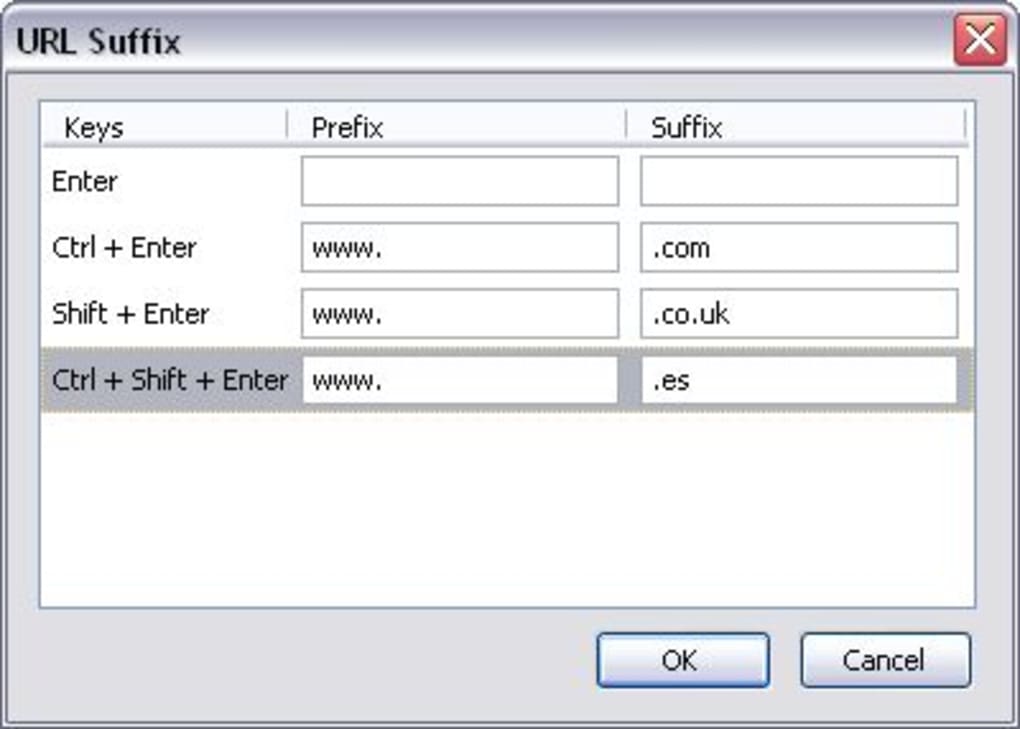
URL Suffix solves that problem by letting you define your own prefix and suffix for three common shortcut combos: Ctrl+Enter, Shift+Enter, and Shift+Ctrl+Enter. Whether you need .net, .org, .dev, or a custom internal corporate domain, a few clicks inside the extension’s options panel let you tailor the behavior to your exact workflow. The interface is intentionally simple—double‑click the shortcut you wish to edit, type the new prefix and suffix, and save.
The changes take effect instantly, making the extension feel like an invisible productivity booster. Although the initial access path (Tools → Add‑ons → Options) is a little buried, the payoff in reduced typing and fewer “Oops, wrong domain” moments is well worth the extra navigation step. URL Suffix is free, open‑source, and updates automatically through Firefox’s add‑on store, ensuring you stay compatible with the latest browser releases without having to manually patch the code.
Key Features
- Customizable Prefix & Suffix: Define any string to be added before and after the typed domain for each shortcut.
- Three Shortcut Levels: Separate configurations for Ctrl+Enter, Shift+Enter, and Shift+Ctrl+Enter, covering .com, .net, .org, or any custom TLD.
- Instant Apply: Changes are saved and applied immediately—no browser restart required.
- Minimal UI Footprint: The options panel opens in a compact dialog, keeping the Firefox UI uncluttered.
- Secure Updates: Receives signed updates from Mozilla’s add‑on repository, guaranteeing authenticity.
- Cross‑Platform Support: Works on all operating systems that support Firefox (Windows, macOS, Linux).
- Open‑Source License: Community‑maintained code allows you to audit or extend the functionality.
Each feature is deliberately lightweight to avoid adding unnecessary bloat to the browser. The extension’s source code is written in plain JavaScript and leverages Firefox’s native browser.commands API, which means it runs efficiently even on older machines. Because it only intercepts three specific key combinations, it does not interfere with other extensions that rely on custom shortcuts. The design philosophy behind URL Suffix is “do one thing, and do it well,” making it an ideal companion for developers, sysadmins, and anyone who spends a substantial portion of their day typing URLs.
Installation, Usage & Compatibility
Step‑by‑Step Installation
- Open Firefox and navigate to the URL Suffix add‑on page.
- Click the Add to Firefox button and confirm the permission prompt.
- After installation, you’ll see a small “URL Suffix” icon in the toolbar (optional). The extension is now active.
- To configure, go to Tools → Add‑ons (or
about:addons), find URL Suffix, and click the Options button.
How to Customize Shortcuts
Inside the Options window you’ll see three rows, each representing a shortcut combination. Double‑click the row you wish to edit. A tiny form appears where you can type a new prefix (e.g., https://) and a new suffix (e.g., .dev).
Press Enter or click Save. From that moment on, typing myproject and hitting the chosen shortcut will open https://myproject.dev. You can set different suffixes for each shortcut, allowing you to keep a fast .com shortcut for general browsing while reserving .net or .org for specific tasks.
Compatibility
URL Suffix runs on any operating system that supports the latest version of Firefox, including Windows 10/11, macOS Ventura and later, and popular Linux distributions (Ubuntu, Fedora, Debian, etc.). Because it relies solely on the WebExtension API, it remains functional across Firefox ESR (Extended Support Release) and the standard release channel. Users of Firefox for Android and iOS will not see this extension, as those platforms currently lack support for custom keyboard shortcuts. For desktop users, the extension is fully compatible with Firefox Quantum (version 57+) and automatically updates through the Mozilla add‑on store, ensuring continued compatibility with future browser releases.
Should you encounter a conflict with another add‑on that also uses the same shortcut keys, you can re‑assign the conflicting keys in Firefox’s built‑in about:config or disable the overlapping extension. In practice, such conflicts are rare because URL Suffix only registers three specific combinations, and most other extensions either avoid these defaults or provide an option to change them.
Pros & Cons
Pros
- Highly customizable—tailor prefixes and suffixes to match any workflow.
- Instant application of changes—no need to restart Firefox.
- Lightweight footprint; negligible impact on browser performance.
- Free and open‑source, with regular signed updates from Mozilla.
- Works across all major desktop operating systems.
Cons
- Accessing the options panel requires a few extra clicks (Tools → Add‑ons → Options).
- Not available on Firefox for Android or iOS, limiting mobile utility.
- Only supports three shortcut variations; users needing more complex patterns must look for additional scripting solutions.
- Relies on the user remembering which shortcut corresponds to which suffix.
Overall, URL Suffix delivers a focused solution for a niche but frequent annoyance—hard‑coded .com shortcuts. Its simplicity is both its greatest strength and a minor limitation for power users who crave deeper customization. The extension’s open‑source nature, zero cost, and seamless integration with Firefox make it a solid addition to any developer’s or researcher’s toolkit.
Frequently Asked Questions
Can I set a different prefix for each shortcut?
Yes. In the Options window you can edit the prefix field for Ctrl+Enter, Shift+Enter, and Shift+Ctrl+Enter independently. This lets you, for example, prepend https:// for .com sites while using ftp:// for an internal server shortcut.
Will URL Suffix work with private browsing windows?
Yes. The extension runs in all Firefox contexts, including private windows, because it does not store any personal data—only the shortcut configuration, which is saved in your profile.
Is the extension safe to install?
Absolutely. URL Suffix is distributed through Mozilla’s official add‑on store, signed by Mozilla, and receives regular security updates. It does not request any permissions beyond managing keyboard shortcuts.
Can I export or share my shortcut configuration?
Currently the add‑on does not include an export feature. However, because the settings are stored in a simple JSON file within your Firefox profile, you can manually copy the url_suffix.json file and share it with teammates.
What should I do if the shortcut stops working after a Firefox update?
First, verify that the add‑on is still enabled in about:addons. If it’s disabled, re‑enable it. If the problem persists, check the extension’s page on the Mozilla add‑on store for a newer version that addresses compatibility with the latest Firefox release.
Conclusion & Call to Action
URL Suffix fills a very specific gap in the Firefox ecosystem: the ability to customize the ever‑useful Ctrl+Enter shortcut for domains that are not .com. Its straightforward interface, instant‑apply settings, and cross‑platform compatibility make it a practical productivity boost for developers, IT professionals, and anyone who spends a lot of time typing URLs. While the navigation to the options panel could be streamlined and the extension isn’t available on mobile, these are minor trade‑offs compared with the time saved each day. If you frequently browse to .net, .org, or custom internal domains, installing URL Suffix is a free, secure way to tailor Firefox to your workflow. Download URL Suffix today from the Mozilla Add‑ons site and start typing smarter, not harder.







